
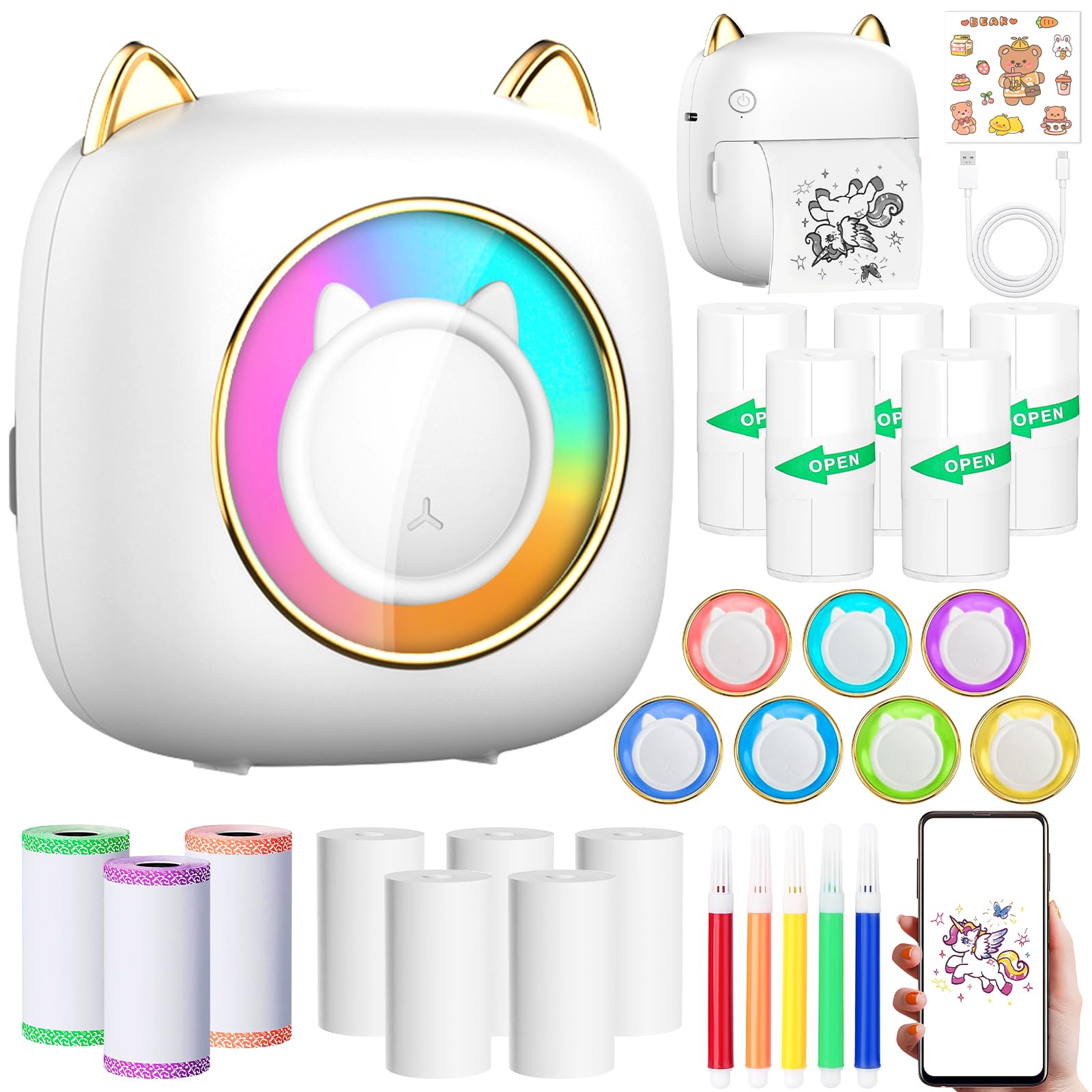
Portable Bluetooth Thermal Printer for iOS & Android, 14 Paper Rolls, White
This product is sold by Amazon
Product description
ZQEJEFD Mini Thermal Printer This photo printer is easy to use and supports most iOS and Android devices. It supports Bluetooth 5.1 for a fast connection. Material: ABS Paper size: 57 mm x 25 mm Printer dimensions: 9.5 x 8.5 x 5 cm Weight: 160 g Printing type: Thermal printing Resolution: 200 DPI Power supply: 3.7 V, 1200 mAh Input voltage: 5 V, 2 A Connection: Bluetooth 5.1 7-color LED lighting upgrade — unique LED lighting Anytime, anywhere — multifunction printing Images: Enjoy printing all kinds of images from your phone with this instant photo printer. Scanning: Scan an object using the app and convert it directly into a digital version for printing, saving time and effort. OCR: With OCR, text can be scanned and converted into a digital version, which you can then edit and print as you like. Graphics: Our graphics will surprise you with their designs and numbers. Templates: Many free templates are available and updated from time to time. Use them to create a special journal. Text: This feature is perfect if you want to print long text. Print from the web: Print online pages and customize web pages by importing URLs to capture your social life anytime. Toolbox: Find banner printing and a handy ruler function here. How to use When you receive the printer, charge it fully. Press and hold the power button for 5 seconds to turn it on. Follow the manual to download the “Fun Print” app. Open the app, register an account and log in. Tap “Add device” in the app to pair the printer, then connect your phone via Bluetooth to start using it. Note: Remove the old paper roll and insert the new roll in the direction shown. Make sure the paper is straight and not twisted. (Note: Leave 2 cm of the new thermal paper extending from the paper compartment so the machine can automatically feed the paper when the compartment is closed.) Close the paper compartment; the machine will automatically feed the paper during normal use. Once the steps above have been completed correctly, the machine can print normally. The printer prints in black and white only and does not support color printing. We recommend using 57 x 25 mm receipt paper. To prevent paper jams, unroll the paper and place it in the mini printer. Upgraded multifunction printer The app includes a variety of templates to choose from! This upgraded mini printer is versatile and supports printing QR codes, albums, journals, storage labels, lists, memos and photos. Multifunction thermal printer compatible with iOS and Android Supports Bluetooth 5.1 for a fast connection. No cables are needed to connect to smartphones, and it is easy to use. The Mini Printer for Mobile is compatible with iOS and Android. High-performance design Save time and effort with the long-lasting 1200 mAh battery. This mini thermal photo printer for smartphones offers up to 4 hours of printing. Ink-free thermal printing technology The Bluetooth thermal printer uses thermal printing technology, which requires no ink and is cleaner. Outstanding black-and-white images add elegance to your photos. Note: If the print becomes faint after frequent use, you can clean the printer’s laser blade with alcohol (the laser blade is located in the paper compartment). Package includes 1 x photo printer 5 + 1 x thermal paper (one roll is included with the printer) 5 x self-adhesive thermal printing paper 3 x lace thermal receipt paper 5 x colored pens 1 x USB charging cable 1 x sticker 1 x manual Bluetooth thermal printer Capture the good times! This is an ideal gift for students, employees, partners, friends, family and more. Giving them this mini Bluetooth printer is a practical and meaningful gift!